<?xml version="1.0" encoding="utf-8"?><feed xmlns="http://www.w3.org/2005/Atom" ><generator uri="https://jekyllrb.com/" version="3.10.0">Jekyll</generator><link href="http://blog.qpgmr.de/feed.xml" rel="self" type="application/atom+xml" /><link href="http://blog.qpgmr.de/" rel="alternate" type="text/html" /><updated>2026-05-18T17:13:18+00:00</updated><id>http://blog.qpgmr.de/feed.xml</id><title type="html">QPGMR Blog</title><subtitle>IBM i, SQL, RPG and anything else …</subtitle><author><name>Daniel Gross</name></author><entry><title type="html">IBM Bob Enterprise subscriptions - Where do I even start?</title><link href="http://blog.qpgmr.de/2026/05/18/ibm-bob-enterprise-howto.html" rel="alternate" type="text/html" title="IBM Bob Enterprise subscriptions - Where do I even start?" /><published>2026-05-18T00:00:00+00:00</published><updated>2026-05-18T00:00:00+00:00</updated><id>http://blog.qpgmr.de/2026/05/18/ibm-bob-enterprise-howto</id><content type="html" xml:base="http://blog.qpgmr.de/2026/05/18/ibm-bob-enterprise-howto.html"><![CDATA[<p>IBM Bob is probably the hottest piece of software and service right now in the IBM universe. So maybe your company already subscribed to an IBM Bob Enterprise plan.</p>

<p>But where to you start with it? Let’s get our feet wet …</p>

<h3 id="configuring-your-ibm-saas-instance">Configuring your IBM SaaS Instance</h3>

<p>When you recieve your subscription details, you have to create an IBM Cloud SaaS Instance for 
your new Bob subscription.</p>

<ul>
  <li>
    <p>Go to: https://ibm-cloud.console.saas.ibm.com</p>
  </li>
  <li>
    <p>Log in with the <strong>IBM ID that has received the subscription details</strong></p>
  </li>
  <li>
    <p>Create a SaaS instance and add the subscription to it</p>

    <p><img src="/assets/img/2026-05-18-bob-saas-console.jpeg" alt="IBM SaaS Console" /></p>
  </li>
</ul>

<p>You don’t have to add users or admins here - but you can. But these users/admins have nothing 
to do with IBM Bob - they only have usage/management rights for your SaaS instance.</p>

<h3 id="configuring-your-bob-users">Configuring your Bob users</h3>

<p>Now we have to configure our Bob users and teams.</p>

<p><strong>Also this step has to be done with the primary IBM ID that has recieved the subscription
details and has set up the SaaS instance.</strong></p>

<ul>
  <li>
    <p>Start here: https://bob.ibm.com/admin/</p>

    <p><img src="/assets/img/2026-05-18-bob-admin.jpeg" alt="Bob Admin" /></p>
  </li>
  <li>
    <p>Select your newly created instance and continue:</p>

    <p><img src="/assets/img/2026-05-18-bob-admin-subscriptions.jpeg" alt="Bob Admin Subscriptions" /></p>
  </li>
  <li>
    <p>In the next steps, create your users (using their IBM IDs) and your team(s):</p>

    <p><img src="/assets/img/2026-05-18-bob-admin-users.jpeg" alt="Bob Admin Users" /></p>

    <p>On the users page, you can give some IBM IDs admin rights, so they can manage the
team, users, spending limits, etc. I really recommend to have at least 2 users
with admin rights.</p>

    <p><img src="/assets/img/2026-05-18-bob-admin-teams.jpeg" alt="Bob Admin Teams" /></p>

    <p>At the team page you can not only manage, how the spending limit should be per team,
but also for each individual team member.</p>
  </li>
</ul>

<h3 id="use-your-enterprise-subscription-in-the-bob-ide">Use your Enterprise subscription in the Bob IDE</h3>

<p>This last step is for each user. Most probably the users already participated in the free 
IBM Bob Trial. And this means, that their IBM ID already has a SaaS instance and a Team 
associated. So each user might have to switch the team, to use the Enterprise subscription.</p>

<ul>
  <li>
    <p>After logging in click on the small gear to open the Bob Settings:</p>

    <p><img src="/assets/img/2026-05-18-bob-team-selection.png" alt="Bob Team Selection" /></p>
  </li>
</ul>

<p>Now you should be able to use the Enterprise subscription that are associated to your IBM ID.</p>

<h3 id="finally">Finally</h3>

<p>As our team had a bit of a hard time to get this all going, I hope this helps others to get 
their Enterprise subscriptions going.</p>

<p>Also when you participated in the free IBM Bob Trial and make a individual subscription 
later, you might have to switch the “Team” in the Bob IDE, as your paid subscription and 
the free trial may use different “Teams”.</p>]]></content><author><name>Daniel Gross</name></author><category term="Bob" /><category term="Enterprise" /><summary type="html"><![CDATA[IBM Bob is probably the hottest piece of software and service right now in the IBM universe. So maybe your company already subscribed to an IBM Bob Enterprise plan.]]></summary></entry><entry><title type="html">Tips and Tricks for RDi 9.9</title><link href="http://blog.qpgmr.de/2026/05/06/rdi-99-tips.html" rel="alternate" type="text/html" title="Tips and Tricks for RDi 9.9" /><published>2026-05-06T00:00:00+00:00</published><updated>2026-05-06T00:00:00+00:00</updated><id>http://blog.qpgmr.de/2026/05/06/rdi-99-tips</id><content type="html" xml:base="http://blog.qpgmr.de/2026/05/06/rdi-99-tips.html"><![CDATA[<h3 id="installation">Installation</h3>

<p>The installations works the same way, as with RDi 9.8. So if you want to know more, just read my posts about this:</p>

<ul>
  <li><a href="/2024/12/05/rdi-tips-tricks">Rational Developer for i 9.8 - Tips and Tricks</a></li>
  <li><a href="/2025/05/13/rdi98-w11-24h2">RDi 9.8 vs. Windows 11 24H2</a></li>
</ul>

<p>Most of the tips and tricks are still valid - but also read the following tips which are special for RDi 9.9.</p>

<hr />

<h3 id="problems-with-special-or-national-characters-in-the-source-code">Problems with special or national characters in the source code?</h3>

<p>I’m from Germany, and we have a few national characters which occationally also end up in our sources. 
But sometimes we also have problems with chars like <code class="language-plaintext highlighter-rouge">#</code> in our RPG sources, which are caused by the new 
Java runtime, that RDi 9.9 is using. The new JRE uses UTF-8 as it’s default, but RDi still depends on 
Windows Code Page 1252.</p>

<p>In that case, LPEX marks perfectly fine code as incorrect - but the code compiles without problems.</p>

<p>You simply have to make a change in your <code class="language-plaintext highlighter-rouge">RDi.ini</code>, which you find in the installation directory of RDi 9.9:</p>

<p><img src="/assets/img/2026-05-06-rdi-99-ini-cp1252.png" alt="Add CP1252 to RDi.ini" /></p>

<p>Insert this directly after the line `-vmargs’:</p>
<div class="language-plaintext highlighter-rouge"><div class="highlight"><pre class="highlight"><code>-Dfile.encoding=CP1252
</code></pre></div></div>
<p>It seems that people in the US and UK don’t have this problem - so just test, if you have syntax errors 
flagged in LPEX which compile fine - this might be your solution.</p>

<hr />

<h3 id="rdi-ui-langague">RDi UI langague</h3>

<p>The national language translations for RDi are quite good - much better than back at version 9.8.0.0. 
But even as I work in Germany, I like my RDi in English.</p>

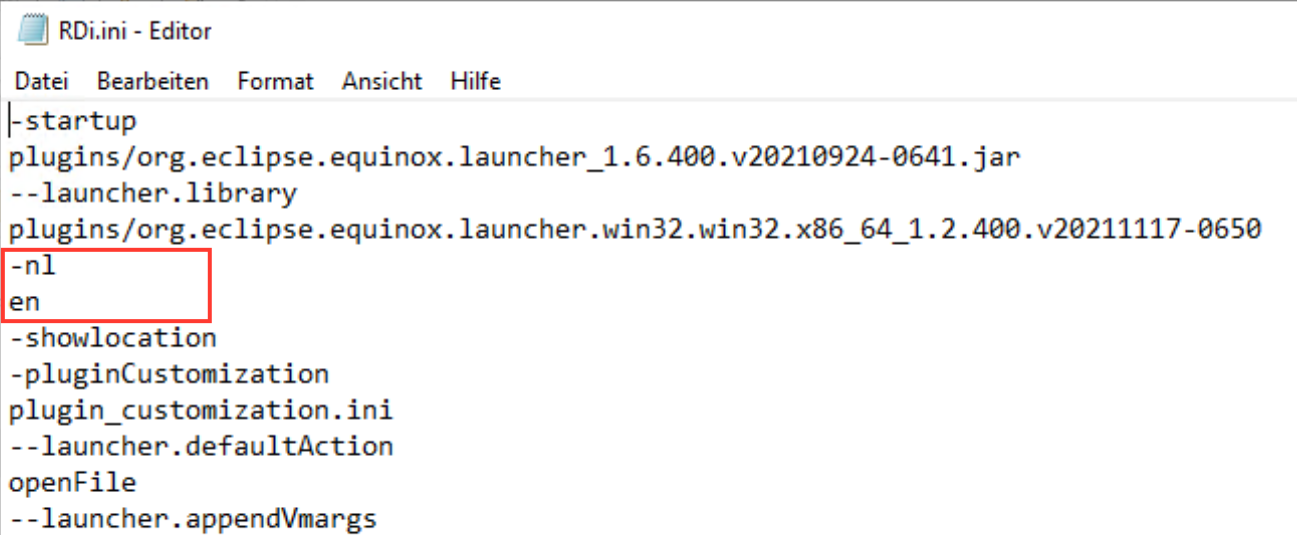
<p>To use RDi 9.9 in English, you also have to edit your “RDi.ini”:</p>

<p><img src="/assets/img/2026-05-06-rdi-99-ini-nl-en.png" alt="Ann nl-en to RDi.ini" /></p>

<p>Adter the line <code class="language-plaintext highlighter-rouge">plugins/org.eclipse.equinox.launcher.win32.win32....</code> just add the followinf 2 lines:</p>
<div class="language-plaintext highlighter-rouge"><div class="highlight"><pre class="highlight"><code>-nl
en
</code></pre></div></div>

<hr />

<h2 id="to-be-continued-"><em>To be continued …</em></h2>
<p><em>Mit den diesen beiden Zeilen wird RDi 9.9 auf die Default-Sprache Englisch gesetzt.</em></p>]]></content><author><name>Daniel Gross</name></author><category term="Other" /><summary type="html"><![CDATA[Installation]]></summary></entry><entry><title type="html">IBM Bob on macOS</title><link href="http://blog.qpgmr.de/2026/04/15/ibm-bob-on-macos.html" rel="alternate" type="text/html" title="IBM Bob on macOS" /><published>2026-04-15T00:00:00+00:00</published><updated>2026-04-15T00:00:00+00:00</updated><id>http://blog.qpgmr.de/2026/04/15/ibm-bob-on-macos</id><content type="html" xml:base="http://blog.qpgmr.de/2026/04/15/ibm-bob-on-macos.html"><![CDATA[<p>On March, 24th 2026 - IBM released Bob, their new AI driven IDE. And from day one, some users reported strange issues where the IBM Bob IDE looks just like a plain Visual Studio Code installation with Bob on the “splash screen”.</p>

<p><img src="/assets/img/2025-04-15-ibm-bob-not-launching.png" alt="IBM Bob not launching" /></p>

<p>In that screen shot there is no Bob icon in title bar (right of the Search field) and the IBM BOB view 
is not visible.</p>

<p>If you see this, after you have installed IBM Bob, you are not alone - try the following steps to fix 
the issue.</p>

<hr />

<h3 id="the-temporary-solution">The temporary(!) solution</h3>

<p>We all hope, that IBM will address the problem with a fix soon - but as long as there is no fix, you can try this workaround:</p>

<ol>
  <li>
    <p>Open Finder and go to the folder where you installed IBM Bob. Normally it should reside in the folder „Applications“.</p>
  </li>
  <li>
    <p>Right click on the IBM Bob app and select „Show Package Contents“. As you maybe already know, applications on macOS are special directory structures - so called “Packages” - that contain all resources an app needs to run. With „Show Package Contents“ we dive into that directory structure.</p>
  </li>
  <li>
    <p>In the folder that opens, navigate to the sub-folder „Contents“, “Resources”, “app”, “extensions” and lokate the subfolder “bob-code”:</p>

    <p><img src="/assets/img/2026-04-15-ibm-bob-package-contents.png" alt="IBM Bob app package contents" /></p>
  </li>
  <li>
    <p>Right click on the folder “bob-code” and select “Get Info” from the context menu.
<img src="/assets/img/2026-04-15-ibm-bob-bob-code-permissions.png" alt="IBM Bob app package contents" />
You see, that “everyone” has “No Access” to that folder - and those missing permissions seem to 
be the problem. Close this Info window.</p>
  </li>
  <li>
    <p>Now right click on the top sub-folder “Contents” and select “Get Info” from the context menu.
<img src="/assets/img/2026-04-15-ibm-bob-contents-permissions.png" alt="IBM Bob app package contents" /></p>
  </li>
  <li>
    <p>Click on the small lock icon in the lower right corner of the Info window and enter your password 
to make the permissions editable. The small lock has to be “open” to change anything.</p>
  </li>
  <li>
    <p>Change the permissions for “everyone” to “Read Only”.</p>
  </li>
  <li>
    <p>Click on small circle with the 3 dots and select the “Apply to enclosed items” and confirm it. 
This may take some seconds, as the permissions are now written to all subfolders and files in
the application package. 
<img src="/assets/img/2026-04-15-ibm-bob-contents-permissions-apply.png" alt="IBM Bob app package contents" /></p>
  </li>
  <li>
    <p>Close the Info window and your Finder window and try start the IBM Bob app again. 
It should work now.</p>
  </li>
</ol>

<p>An alternative way to change the permissions is to use the command line tool <code class="language-plaintext highlighter-rouge">chmod</code> - open a Terminal window and enter the following command:</p>

<div class="language-sh highlighter-rouge"><div class="highlight"><pre class="highlight"><code><span class="nv">$ </span><span class="nb">sudo chmod </span>0755 <span class="nt">-R</span> <span class="s2">"/Applications/IBM Bob.app"</span>
</code></pre></div></div>

<p>If you renamed the app to something else, replace “IBM Bob.app” with the name of your app. The <code class="language-plaintext highlighter-rouge">-R</code> flag means “recursive”, so it will change the permissions for all subfolders and files. The <code class="language-plaintext highlighter-rouge">0755</code> is the octal representation of the permissions, which means “read, write and execute for the owner, read and execute for the group and others”.</p>

<hr />

<p>I hope this helps! Let me know if you have any questions.</p>]]></content><author><name>Daniel Gross</name></author><category term="Other" /><summary type="html"><![CDATA[On March, 24th 2026 - IBM released Bob, their new AI driven IDE. And from day one, some users reported strange issues where the IBM Bob IDE looks just like a plain Visual Studio Code installation with Bob on the “splash screen”.]]></summary></entry><entry><title type="html">Running “automatic” exit procedures with ON-EXIT</title><link href="http://blog.qpgmr.de/2026/03/03/exit-procs-on-exit.html" rel="alternate" type="text/html" title="Running “automatic” exit procedures with ON-EXIT" /><published>2026-03-03T00:00:00+00:00</published><updated>2026-03-03T00:00:00+00:00</updated><id>http://blog.qpgmr.de/2026/03/03/exit-procs-on-exit</id><content type="html" xml:base="http://blog.qpgmr.de/2026/03/03/exit-procs-on-exit.html"><![CDATA[<p>In programming, cleaning up behind you is important. Nobody wants to leave a mess when 
a procedure, program, service program or job ends - even if it ends “unplaned” (with 
an error or exception), “furcefully” (like <code class="language-plaintext highlighter-rouge">ENDJOB</code>) or perfectly fine.</p>

<p>In post - and at least 2 upcoming posts - I want to discuss and describe the common 
options that we have, to gracefully end our procedures, programs, service programs 
or jobs, even when an error or exception occurs or the job is ended unplaned.</p>

<p>First we take a look not only at the most modern option, but also at easiest to implement - 
the <code class="language-plaintext highlighter-rouge">ON-EXIT</code> statement in ILE-RPG.</p>

<h3 id="running-an-exit-routine-after-your-procedure-with-on-exit">Running an exit routine after your procedure with <code class="language-plaintext highlighter-rouge">ON-EXIT</code></h3>

<p>In <a href="http://ibm.biz/RPG_ON_EXIT_Section">2016 ILE-RPG was extended</a> with the 
<a href="https://www.ibm.com/docs/en/i/7.6.0?topic=codes-exit-exit"><code class="language-plaintext highlighter-rouge">ON-EXIT</code></a> keyword/statement. 
It creates a “sub-procedure” inside your own procedure - and this “sub-procedure” is 
executed whenever(!) your procedure ends - whether it’s a normal end (by using return) 
or an abnormal end (by an exception).</p>

<p>Even when the job, in which your procedure runs, is ended with <code class="language-plaintext highlighter-rouge">*IMMED</code> the <code class="language-plaintext highlighter-rouge">ON-EXIT</code> 
section will still be executed.</p>

<p>Here a small example to see how easy this is:</p>
<pre><code class="language-rpgle">**free
ctl-opt actgrp(*new);

myProcedure();
*inlr = *on;
retrurn;

dcl-proc myProcedure;
  dcl-pi *n ind extproc(*dclcase);
  end-pi;

  dcl-s isAbnormalEnd ind inz;

  snd-msg *info 'This is the '+%proc()+' procedure ...';

  return *on;

  on-exit isAbnormalEnd;
    snd-msg *info 'This is the ON-EXIT procedure called '+%proc(*onexit);
    if isAbnormalEnd;
      snd-msg *info 'Procedure '+%proc(*owner)+' ended abnormal!';
      return *off;
    endif;
end-proc;
</code></pre>

<p>So whenever this procedure ends, the <code class="language-plaintext highlighter-rouge">ON-EXIT</code> block is executed. If the procedure is ending abnormal - 
i.e. due to an exception - the flag <code class="language-plaintext highlighter-rouge">isAbnormalEnd</code> in set to <code class="language-plaintext highlighter-rouge">*ON</code>. You have to declare the 
<code class="language-plaintext highlighter-rouge">isAbnormalEnd</code> indicator (boolean) variable - it can be procedure local or globally declared.</p>

<p>What happens is, that the <code class="language-plaintext highlighter-rouge">ON-EXIT</code> sub-procedure is executed, whether a <code class="language-plaintext highlighter-rouge">RETURN</code> is executed or an
unhandled exception occurs. Exceptions that are handled by a <code class="language-plaintext highlighter-rouge">MONITOR</code> group or by an <code class="language-plaintext highlighter-rouge">E</code> operation
extender will <strong>NOT</strong> trigger the <code class="language-plaintext highlighter-rouge">ON-EXIT</code> procedure.</p>

<p>Please try it - compile the program and call it. In the job log you should see 2 messages:</p>

<div class="language-plaintext highlighter-rouge"><div class="highlight"><pre class="highlight"><code>  This is the myProcedure procedure ...                         
  This is the ON-EXIT procedure called _QRNI_ON_EXIT_myProcedure
</code></pre></div></div>

<p>As you can see - after the <code class="language-plaintext highlighter-rouge">RETURN</code>, the <code class="language-plaintext highlighter-rouge">ON-EXIT</code> sub-procedure was executed - and <code class="language-plaintext highlighter-rouge">isAbnormalEnd</code>
was <strong>NOT</strong> active.</p>

<h3 id="on-exit-when-an-exception-occurs"><code class="language-plaintext highlighter-rouge">ON-EXIT</code> when an exception occurs</h3>

<p>Now we want to test the abnormal end - so we modify like this:</p>
<pre><code class="language-rpgle">**free
//...
dcl-proc myProcedure;
  dcl-pi *n ind extproc(*dclcase);
  end-pi;

  dcl-s isAbnormalEnd ind inz;
  dcl-s num int(10) inz;

  snd-msg *info 'This is the '+%proc()+' procedure ...';

  num = num / num; // -&gt; exception will occur

  snd-msg *info 'Just before RETURN from '+%proc()+' ...';
  return *on;

  on-exit isAbnormalEnd;
    snd-msg *info 'This is the ON-EXIT procedure called '+%proc(*onexit);
    if isAbnormalEnd;
      snd-msg *info 'Procedure '+%proc(*owner)+' ended abnormal!';
      return *off;
    endif;
end-proc;
</code></pre>

<p>If we compile and call the program now, you will receive an exception message, and the 
follwowing messages in your job log:</p>

<div class="language-plaintext highlighter-rouge"><div class="highlight"><pre class="highlight"><code>  This is the myProcedure procedure ...                          
  Attempt made to divide by zero for fixed point operation.      
  The call to myProcedur ended in error (C G D F).               
? C                                                              
  This is the ON-EXIT procedure called _QRNI_ON_EXIT_myProcedure 
  Procedure myProcedure ended abnormal!                          
  Application error.  MCH1211 unmonitored by ON_EXIT at statement 0000000017, instruction X'0000'.                             
</code></pre></div></div>

<p>Nice - even as our procedure never reached the <code class="language-plaintext highlighter-rouge">RETURN</code> statement, the <code class="language-plaintext highlighter-rouge">ON-EXIT</code> sub-procedure
is still executed. But this time, <code class="language-plaintext highlighter-rouge">isAbnormalEnd</code> is set to <code class="language-plaintext highlighter-rouge">*ON</code>.</p>

<h3 id="on-exit-when-the-job-or-program-is-ended-forcefully"><code class="language-plaintext highlighter-rouge">ON-EXIT</code> when the job or program is ended <em>forcefully</em></h3>

<p>What happens, when we end the program or job <em>forcefully</em>. Like with <code class="language-plaintext highlighter-rouge">SysReq</code> option 2 or with
an <code class="language-plaintext highlighter-rouge">ENDJOB</code> command. So let’s modify our procedure again - this time with an endless loop:</p>

<pre><code class="language-rpgle">**free
//...
dcl-proc dcl-proc myProcedure;
  dcl-pi *n ind extproc(*dclcase);
  end-pi;

  dcl-s isAbnormalEnd ind inz;
  dcl-pr sleep uns(10) extproc('sleep');
    seconds uns(10) value;
  end-pr;

  snd-msg *info 'This is the '+%proc()+' procedure ...';

  dow *on;
    snd-msg *info 'Inside the endless loop ...';
    sleep(5); // sleeping for 5 seconds
  enddo;

  snd-msg *info 'We should never reach this ...';
  return *on;

  on-exit isAbnormalEnd;
    snd-msg *info 'This is the ON-EXIT procedure called '+%proc(*onexit);
    if isAbnormalEnd;
      snd-msg *info 'Procedure '+%proc(*owner)+' ended abnormal!';
      return *off;
    endif;
end-proc;
</code></pre>

<p>We compile the program and call it form the command line - it will run endlessly, so
we interrupt it with <code class="language-plaintext highlighter-rouge">SysReq 2</code> - and we find this in the job log:</p>
<div class="language-plaintext highlighter-rouge"><div class="highlight"><pre class="highlight"><code>  This is the myProcedure procedure ...                         
  Inside the endless loop ...                                   
  Inside the endless loop ...                                   
&gt;  *SYSTEM/ENDRQS                                               
  This is the ON-EXIT procedure called _QRNI_ON_EXIT_myProcedure
  Procedure myProcedure ended abnormal!                         
</code></pre></div></div>

<p>Like in the case of the exception, the <code class="language-plaintext highlighter-rouge">ON-EXIT</code> gets executed, and <code class="language-plaintext highlighter-rouge">isAbnormalEnd</code> is
<code class="language-plaintext highlighter-rouge">*ON</code>.</p>

<p>Now submit the program into the background with <code class="language-plaintext highlighter-rouge">SBMJOB CMD(CALL PGM(ON_EXIT)) JOB(ON_EXIT)</code> 
and check for the running job with <code class="language-plaintext highlighter-rouge">WRKSBMJOB</code>. Find your job, and use option <code class="language-plaintext highlighter-rouge">4</code> and <code class="language-plaintext highlighter-rouge">F4</code>. 
You can end the job with <code class="language-plaintext highlighter-rouge">OPTION(*CNTRLD)</code> or with <code class="language-plaintext highlighter-rouge">OPTION(*IMMED)</code> - it doesn’t matter.</p>

<p>If we inspect the printed job log, we will also find the messages from the <code class="language-plaintext highlighter-rouge">ON-EXIT</code>
sub-procedure - even when we used <code class="language-plaintext highlighter-rouge">OPTION(*IMMED)</code>.</p>

<p>This means, that <code class="language-plaintext highlighter-rouge">*IMMED</code> is not so <em>instantly</em> as we always thought. Our <code class="language-plaintext highlighter-rouge">ON-EXIT</code>
sub-procedure, and also all other <code class="language-plaintext highlighter-rouge">ON-EXIT</code> sub-procedures in the call-stack will be
executed, even when we try to end the job as fast as we can.</p>

<h3 id="what-else-can-on-exit-can-do">What else can <code class="language-plaintext highlighter-rouge">ON-EXIT</code> can do?</h3>

<p>Inside the <code class="language-plaintext highlighter-rouge">ON-EXIT</code> sub-procedure you have several options. You get the name of LR
<em>original</em> procedure with <code class="language-plaintext highlighter-rouge">%PROC(*OWNER)</code>. Whereas <code class="language-plaintext highlighter-rouge">%PROC(*ONEXIT)</code> is returning the 
name of the <code class="language-plaintext highlighter-rouge">ON-EXIT</code> “sub-procedure” - in our case this is <code class="language-plaintext highlighter-rouge">_QRNI_ON_EXIT_myProcedure</code>.</p>

<p>An interesting option is, that from inside the <code class="language-plaintext highlighter-rouge">ON-EXIT</code> sub-procedure, you can also return 
a completly other return value, than that of the original procedure. If you don’t code a 
<code class="language-plaintext highlighter-rouge">RETURN</code> in <code class="language-plaintext highlighter-rouge">ON-EXIT</code> or if that <code class="language-plaintext highlighter-rouge">RETURN</code> is conditioned (like in our example) the original
return value is returned.</p>

<p>Inside the <code class="language-plaintext highlighter-rouge">ON-EXIT</code> sub-procedure you have access to all variables defined inside the
owner procedure. You can also access all global variables. This means, the <code class="language-plaintext highlighter-rouge">ON-EXIT</code> 
sub-procedure runs in the same scope as the owner procedure.</p>

<h3 id="when-can-we-use-it">When can we use it?</h3>

<p>The <code class="language-plaintext highlighter-rouge">ON-EXIT</code> opcode is available for every procedure. In the case of a <code class="language-plaintext highlighter-rouge">main</code> procedure,
it’s only available in <strong>linear</strong> <code class="language-plaintext highlighter-rouge">main</code> procedures - meaning those, that are indicated by
the control keyword <code class="language-plaintext highlighter-rouge">MAIN(...)</code>.</p>

<p>You cannot use <code class="language-plaintext highlighter-rouge">ON-EXIT</code> inside a <strong>cycle</strong> main procedure - those where you have to set 
<code class="language-plaintext highlighter-rouge">*ILR</code> to <code class="language-plaintext highlighter-rouge">*ON</code> to end the program (like in our example). But you can use them in each and 
every procedure that might get called from than cycle main procedure.</p>

<h3 id="on-exit-finally"><code class="language-plaintext highlighter-rouge">ON-EXIT</code> <em>finally</em></h3>

<p>The <code class="language-plaintext highlighter-rouge">ON-EXIT</code> sub-procedure is by far the easiest and most straight-forward solution, to 
clean up. I use it all the time - closing files or SQL cursors, checking for correct 
execution, logging errors and addition information and much more.</p>

<p>In the following post in this series about <em>exit procedures</em> we will have a look at an API
that not only works with <em>linear</em> procedures, but also with <em>cycle</em> main procedures - and
any other type of call stack entry. So stay tuned.</p>

<p>I hope you enyoyed this post - and if you have questions or ideas - I have opened the 
<a href="https://github.com/qpgmr-de/qpgmr-de.github.io/discussions">Discussions</a>
page of this repository - so, if you like, leave a comment.</p>]]></content><author><name>Daniel Gross</name></author><category term="Other" /><summary type="html"><![CDATA[In programming, cleaning up behind you is important. Nobody wants to leave a mess when a procedure, program, service program or job ends - even if it ends “unplaned” (with an error or exception), “furcefully” (like ENDJOB) or perfectly fine.]]></summary></entry><entry><title type="html">IBM Champion 2026</title><link href="http://blog.qpgmr.de/2026/02/25/ibm-champion-2026.html" rel="alternate" type="text/html" title="IBM Champion 2026" /><published>2026-02-25T00:00:00+00:00</published><updated>2026-02-25T00:00:00+00:00</updated><id>http://blog.qpgmr.de/2026/02/25/ibm-champion-2026</id><content type="html" xml:base="http://blog.qpgmr.de/2026/02/25/ibm-champion-2026.html"><![CDATA[<p>My first year as an IBM Champion was very cool. The parcel with the IBM Champion gifts, 
attending IBM TechXchange in Orlando, Fl together with my daughter, meeting great people,
learning new things and teaching what I know to others.</p>

<p>And after meticulously reporting all my “Champions Activities”, I was not SOOO surprised
this year, that I was selected to be an IBM Champion again for 2026.</p>

<p>So now again - I’m an IBM Champion for 2026, and will try make the best out of this year.</p>

<p><img src="/assets/img/ibm-champion-star.png" width="250" height="250" />  <img src="/assets/img/ibm-champion-badge-2026.png" width="250" height="250" /></p>]]></content><author><name>Daniel Gross</name></author><category term="IBMChampion" /><summary type="html"><![CDATA[My first year as an IBM Champion was very cool. The parcel with the IBM Champion gifts, attending IBM TechXchange in Orlando, Fl together with my daughter, meeting great people, learning new things and teaching what I know to others.]]></summary></entry><entry><title type="html">Receiving Job Completion Messages as Status Messages</title><link href="http://blog.qpgmr.de/2026/02/22/rcv-job-comp-msgs-as-status-msgs.html" rel="alternate" type="text/html" title="Receiving Job Completion Messages as Status Messages" /><published>2026-02-22T00:00:00+00:00</published><updated>2026-02-22T00:00:00+00:00</updated><id>http://blog.qpgmr.de/2026/02/22/rcv-job-comp-msgs-as-status-msgs</id><content type="html" xml:base="http://blog.qpgmr.de/2026/02/22/rcv-job-comp-msgs-as-status-msgs.html"><![CDATA[<p>When you are developing on IBM i you can do your compiles interactively - at the end, the compiler sends a completion message, whether the compile was successful or not. This is nice, but the compiler blocks your session during the compilation.</p>

<p>You can opt to make your compiles in batch - so your session is free to do other work. And when the compiled finnishes, it will send you a message whether the compiler job finished successfully or not.</p>

<p>Now you can set your message queue to <code class="language-plaintext highlighter-rouge">*BREAK</code> - which means, that your session will get interupted and the message appears on the screen. Nice, you know in real time that the compiler weas successful - but you were interrupted. OK set your message queue to <code class="language-plaintext highlighter-rouge">*NOTIFY</code> - you will see a small <code class="language-plaintext highlighter-rouge">MW</code> (for Message Waiting) at the bottom of your session, when the compiler was finished - but you can’t see, if the job completed successful or not.</p>

<p>Wouldn’t it be nice, to see the result - without being interrupted?</p>

<p>I don’t remember, where and when I have seen this “trick” first - but is was somewhere in the early to mid 1990s, and I use it since then. And when I searched for it lately, I hard a hard time, finding the tip somewhere online, so I thought, it would be good to have it in my blog.</p>

<p>I haven’t invented this idea - and sadly, I also don’t know who exactly has - so I have to give credit to the <em>unknown programmer</em> who saved me a lot of time in the last 30 years - Thank You!</p>

<p>But now dive in …</p>

<h3 id="creating-a-break-message-handling-program">Creating a Break Message Handling Program</h3>

<p>First, we have to create a small CLP / CLLE program that will handle the messages for us.</p>

<div class="language-cl highlighter-rouge"><div class="highlight"><pre class="highlight"><code><span class="nv">PGM</span> <span class="p">(</span><span class="nv">&amp;MSGQ</span> <span class="nv">&amp;MSGQLIB</span> <span class="nv">&amp;MSGMRK</span><span class="p">)</span>
<span class="nv">DCL</span> <span class="nv">&amp;MSGQ</span> <span class="nv">TYPE</span><span class="p">(</span><span class="nv">*CHAR</span><span class="p">)</span> <span class="nv">LEN</span><span class="p">(</span><span class="mi">10</span><span class="p">)</span>
<span class="nv">DCL</span> <span class="nv">&amp;MSGQLIB</span> <span class="nv">TYPE</span><span class="p">(</span><span class="nv">*CHAR</span><span class="p">)</span> <span class="nv">LEN</span><span class="p">(</span><span class="mi">10</span><span class="p">)</span>
<span class="nv">DCL</span> <span class="nv">&amp;MSGMRK</span> <span class="nv">TYPE</span><span class="p">(</span><span class="nv">*CHAR</span><span class="p">)</span> <span class="nv">LEN</span><span class="p">(</span><span class="mi">4</span><span class="p">)</span>

<span class="nv">DCL</span> <span class="nv">&amp;MSGID</span> <span class="nv">TYPE</span><span class="p">(</span><span class="nv">*CHAR</span><span class="p">)</span> <span class="nv">LEN</span><span class="p">(</span><span class="mi">7</span><span class="p">)</span>
<span class="nv">DCL</span> <span class="nv">&amp;MSGDTA</span> <span class="nv">TYPE</span><span class="p">(</span><span class="nv">*CHAR</span><span class="p">)</span> <span class="nv">LEN</span><span class="p">(</span><span class="mi">1000</span><span class="p">)</span>
<span class="nv">DCL</span> <span class="nv">&amp;MSGDTALEN</span> <span class="nv">TYPE</span><span class="p">(</span><span class="nv">*DEC</span><span class="p">)</span> <span class="nv">LEN</span><span class="p">(</span><span class="mi">5</span> <span class="mi">0</span><span class="p">)</span>
<span class="nv">DCL</span> <span class="nv">&amp;MSGF</span> <span class="nv">TYPE</span><span class="p">(</span><span class="nv">*CHAR</span><span class="p">)</span> <span class="nv">LEN</span><span class="p">(</span><span class="mi">10</span><span class="p">)</span>
<span class="nv">DCL</span> <span class="nv">&amp;MSGFLIB</span> <span class="nv">TYPE</span><span class="p">(</span><span class="nv">*CHAR</span><span class="p">)</span> <span class="nv">LEN</span><span class="p">(</span><span class="mi">10</span><span class="p">)</span>

<span class="nv">RCVMSG</span> <span class="nv">MSGQ</span><span class="p">(</span><span class="nv">&amp;MSGQLIB/&amp;MSGQ</span><span class="p">)</span> <span class="nv">MSGKEY</span><span class="p">(</span><span class="nv">&amp;MSGMRK</span><span class="p">)</span> <span class="nb">+</span>
       <span class="nv">RMV</span><span class="p">(</span><span class="nv">*NO</span><span class="p">)</span> <span class="nv">MSGDTA</span><span class="p">(</span><span class="nv">&amp;MSGDTA</span><span class="p">)</span> <span class="nb">+</span>
       <span class="nv">MSGDTALEN</span><span class="p">(</span><span class="nv">&amp;MSGDTALEN</span><span class="p">)</span> <span class="nv">MSGID</span><span class="p">(</span><span class="nv">&amp;MSGID</span><span class="p">)</span> <span class="nb">+</span>
       <span class="nv">MSGF</span><span class="p">(</span><span class="nv">&amp;MSGF</span><span class="p">)</span> <span class="nv">MSGFLIB</span><span class="p">(</span><span class="nv">&amp;MSGFLIB</span><span class="p">)</span>

<span class="nv">/*</span> <span class="nv">handle</span> <span class="nv">normal</span> <span class="nb">and</span> <span class="nv">abnormal</span> <span class="nv">job</span> <span class="nv">completion</span> <span class="nv">messages</span> <span class="nv">*/</span>
<span class="nv">IF</span> <span class="p">(</span><span class="nv">&amp;MSGID</span> <span class="nv">*EQ</span> <span class="ss">'CPF1241</span><span class="o">'</span> <span class="nv">*OR</span> <span class="nv">&amp;MSGID</span> <span class="nv">*EQ</span> <span class="ss">'CPF1240</span><span class="o">'</span><span class="p">)</span> <span class="nv">DO</span>
  <span class="nv">SNDPGMMSG</span> <span class="nv">MSGID</span><span class="p">(</span><span class="nv">&amp;MSGID</span><span class="p">)</span> <span class="nv">MSGF</span><span class="p">(</span><span class="nv">&amp;MSGFLIB/&amp;MSGF</span><span class="p">)</span> <span class="nb">+</span>
            <span class="nv">MSGDTA</span><span class="p">(</span><span class="nv">&amp;MSGDTA</span><span class="p">)</span> <span class="nv">TOPGMQ</span><span class="p">(</span><span class="nv">*EXT</span><span class="p">)</span> <span class="nb">+</span>
            <span class="nv">TOMSGQ</span><span class="p">(</span><span class="nv">*TOPGMQ</span><span class="p">)</span> <span class="nv">MSGTYPE</span><span class="p">(</span><span class="nv">*STATUS</span><span class="p">)</span>
  <span class="nv">GOTO</span> <span class="nv">FINITO</span>
<span class="nv">ENDDO</span>

<span class="nv">/*</span> <span class="nv">all</span> <span class="nv">other</span> <span class="nv">messages</span> <span class="nb">require</span> <span class="nv">user</span> <span class="nv">intervention</span> <span class="nv">*/</span>
<span class="nv">DSPMSG</span> <span class="nv">MSGQ</span><span class="p">(</span><span class="nv">&amp;MSGQLIB/&amp;MSGQ</span><span class="p">)</span>

<span class="nv">FINITO:</span> <span class="nv">ENDPGM</span> 
</code></pre></div></div>

<p>The parameters for a <em>break message handler</em> program are defined by the system. The is pretty straight forward. First, the program receives the message with the correct <em>marker</em> from the message queue.</p>

<p>If the message is a <code class="language-plaintext highlighter-rouge">CPF1241</code> (Normal End) or <code class="language-plaintext highlighter-rouge">CPF1240</code> (Abnormal End) it sends the message out again as a status message - this will show up in the message line of your interactive session.</p>

<p>If it’s any other message, the program will simply to a DSPMSG of the Message Queue - which means, the message will <em>break</em> through.</p>

<p>Compile this small program to your personal library or anywhere you want it. For the rest of this post, we will assume you compiled it as <code class="language-plaintext highlighter-rouge">YOURLIB/BRKMSGHDL</code>.</p>

<h3 id="attaching-the-break-message-handler-to-your-message-queue">Attaching the Break Message Handler to your Message Queue</h3>

<p>Next, we need to attach our <em>break message handler</em> program to our message queue. The best is, to do that when you sign-in - in the <em>initializing program</em> (<code class="language-plaintext highlighter-rouge">INLPGM</code>) of your user profile.</p>

<p>Check with the command <code class="language-plaintext highlighter-rouge">CHGPRF</code> if you already have an <code class="language-plaintext highlighter-rouge">INLPGM</code>. If this is the case, you can add the commands to it - otherwise create a new one.</p>

<div class="language-cl highlighter-rouge"><div class="highlight"><pre class="highlight"><code><span class="nv">PGM</span>

<span class="nv">DCL</span> <span class="nv">&amp;MSGQ</span> <span class="nv">TYPE</span><span class="p">(</span><span class="nv">*CHAR</span><span class="p">)</span> <span class="nv">LEN</span><span class="p">(</span><span class="mi">10</span><span class="p">)</span>
<span class="nv">DCL</span> <span class="nv">&amp;MSGQLIB</span> <span class="nv">TYPE</span><span class="p">(</span><span class="nv">*CHAR</span><span class="p">)</span> <span class="nv">LEN</span><span class="p">(</span><span class="mi">10</span><span class="p">)</span>

<span class="nv">/*</span> <span class="nb">get</span> <span class="nv">current</span> <span class="nv">users</span> <span class="nv">message</span> <span class="nv">queue</span> <span class="nv">*/</span>
<span class="nv">RTVUSRPRF</span> <span class="nv">USRPRF</span><span class="p">(</span><span class="nv">*CURRENT</span><span class="p">)</span> <span class="nb">+</span>
          <span class="nv">MSGQ</span><span class="p">(</span><span class="nv">&amp;MSGQ</span><span class="p">)</span> <span class="nv">MSGQLIB</span><span class="p">(</span><span class="nv">&amp;MSGQLIB</span><span class="p">)</span>
<span class="nv">MONMSG</span>  <span class="nv">MSGID</span><span class="p">(</span><span class="nv">CPF0000</span><span class="p">)</span>

<span class="nv">/*</span> <span class="nv">attach</span> <span class="k">the</span> <span class="nb">break</span> <span class="nv">message</span> <span class="nv">handler</span> <span class="nv">to</span> <span class="k">the</span> <span class="nv">msgq</span> <span class="nv">*/</span>
<span class="nv">CHGMSGQ</span> <span class="nv">MSGQ</span><span class="p">(</span><span class="nv">&amp;MSGQLIB/&amp;MSGQ</span><span class="p">)</span> <span class="nv">DLVRY</span><span class="p">(</span><span class="nv">*BREAK</span><span class="p">)</span> <span class="nb">+</span>
        <span class="nv">PGM</span><span class="p">(</span><span class="nv">YOURLIB/BRKMSGHDL</span><span class="p">)</span>
<span class="nv">MONMSG</span>  <span class="nv">MSGID</span><span class="p">(</span><span class="nv">CPF0000</span><span class="p">)</span>

<span class="nv">ENDPGM</span>
</code></pre></div></div>

<p>First, the program retrieves the message queue of the current user.</p>

<p>Next, it tries to change the message queue to <code class="language-plaintext highlighter-rouge">*BREAK</code> and attaches the handler. This is not a permanent change, because it lasts only as long, as that session is logged in.</p>

<p>And it only works <strong>one</strong> time - only the first logged in session can attach the <em>break message handler</em> program. This is the reason why a <code class="language-plaintext highlighter-rouge">MONMSG CPF0000</code> after that command is prefenting any error messages.</p>

<p>It’s also a good idea to have a <code class="language-plaintext highlighter-rouge">MONMSG</code> after nearly every command in your <code class="language-plaintext highlighter-rouge">INLPGM</code> - otherwise the program could fail, you might be unable to log in.</p>

<p>Compile this program to your personal library or where you want it. Let’s assume you compiled it as <code class="language-plaintext highlighter-rouge">YOURLIB/STARTMEUP</code>.</p>

<h3 id="changing-your-user-profile">Changing your User Profile</h3>

<p>The last step is to attach the <em>initializing program</em> to your user profile.</p>

<pre><code class="language-clle">CHGPRF INLPGM(YOURLIB/STARTMEUP)
</code></pre>

<p>The command <code class="language-plaintext highlighter-rouge">CHGPRF</code> can be prompted with <code class="language-plaintext highlighter-rouge">F4</code> if you like - the <code class="language-plaintext highlighter-rouge">INLPGM</code> is something like the <code class="language-plaintext highlighter-rouge">.profile</code> in typical <em>*nix</em> operating systems. It is executed when a user logs in.</p>

<h3 id="finally">Finally</h3>

<p>If anything works correctly, you can sign-off and sign-in again. Try the command <code class="language-plaintext highlighter-rouge">SBMJOB CMD(DLYJOB DLY(5)) JOB(TESTMSG)</code> - after 5 seconds (or so) you should see a message <code class="language-plaintext highlighter-rouge">Job ... completed normally</code> in the status/message line of you session.</p>

<p>The completion messages stay in your message quere - so if you ever miss one, you can always look with <code class="language-plaintext highlighter-rouge">DSPMSG</code>.</p>

<p>As long as I can remember, I used this <em>trick</em> - and I hope it will help you too.</p>

<p>If you have questions or ideas - I have opened the 
<a href="https://github.com/qpgmr-de/qpgmr-de.github.io/discussions">Discussions</a>
page of this repository - so, if you like, leave a comment.</p>]]></content><author><name>Daniel Gross</name></author><category term="Other" /><summary type="html"><![CDATA[When you are developing on IBM i you can do your compiles interactively - at the end, the compiler sends a completion message, whether the compile was successful or not. This is nice, but the compiler blocks your session during the compilation.]]></summary></entry><entry><title type="html">Named columns for the SQL INSERT statement</title><link href="http://blog.qpgmr.de/2025/10/23/insert-values-named-columns.html" rel="alternate" type="text/html" title="Named columns for the SQL INSERT statement" /><published>2025-10-23T00:00:00+00:00</published><updated>2025-10-23T00:00:00+00:00</updated><id>http://blog.qpgmr.de/2025/10/23/insert-values-named-columns</id><content type="html" xml:base="http://blog.qpgmr.de/2025/10/23/insert-values-named-columns.html"><![CDATA[<p>As the anouncement is out some days, a lot was written about the next Technology Refreshes 
for IBM i version 7.6 (TR1) and version 7.5 (TR7).</p>

<ul>
  <li><a href="https://www.ibm.com/docs/en/announcements/adds-new-capabilities-enhancements-i-76-technology-refresh-1">IBM i 7.6 Technology Refresh 1</a></li>
  <li><a href="https://www.ibm.com/docs/en/announcements/adds-new-capabilities-enhancements-i-75-technology-refresh-7">IBM i 7.5 Technology Refresh 7</a></li>
</ul>

<p>As always the TRs are packed with new features, but I want to highlight one, that is my personal
favorite.</p>

<p>The SQL <code class="language-plaintext highlighter-rouge">INSERT</code> statement gets a new <em>named columns</em> syntax for the <code class="language-plaintext highlighter-rouge">VALUES</code> clause. But before we
have a look at this, let’s look at the syntax of the <code class="language-plaintext highlighter-rouge">INSERT</code> statement as we know it.</p>

<h3 id="the-traditional-insert-statement-syntax">The <em>traditional</em> <code class="language-plaintext highlighter-rouge">INSERT</code> statement syntax</h3>

<p>The SQL <code class="language-plaintext highlighter-rouge">INSERT</code> statements purpose is to create new rows in a table. The traditional and standard 
syntax is which looks familiar since 1992:</p>

<div class="language-sql highlighter-rouge"><div class="highlight"><pre class="highlight"><code><span class="k">insert</span> <span class="k">into</span> <span class="n">mytable</span> <span class="p">(</span><span class="n">column1</span><span class="p">,</span> <span class="n">column2</span><span class="p">,</span> <span class="n">column3</span><span class="p">)</span>
<span class="k">values</span> <span class="p">(</span><span class="s1">'Value 1'</span><span class="p">,</span> <span class="mi">2</span><span class="p">,</span> <span class="s1">'Value 3'</span><span class="p">);</span>
</code></pre></div></div>

<p>If you don’t want to supply values for every column of the table, you list the table columns in
parentheses and the values in <code class="language-plaintext highlighter-rouge">VALUES</code> clause - exactly in the same order.</p>

<p>If you have lot of columns and a lot of values, this is a common source for errors. And here
the new syntax, that is introduced with the new TRs, will be a huge improvement.</p>

<h3 id="the-new-insert-named-columns-syntax">The new <code class="language-plaintext highlighter-rouge">INSERT</code> <em>named columns</em> syntax</h3>

<p>You can read about the new syntax here: <a href="https://www.ibm.com/docs/en/i/7.6.0?topic=statement-inserting-rows-using-values-clause">Inserting rows using the values clause</a></p>

<p>But let’s look at a short example first:</p>

<div class="language-sql highlighter-rouge"><div class="highlight"><pre class="highlight"><code><span class="k">insert</span> <span class="k">into</span> <span class="n">mytable</span> <span class="k">values</span> <span class="p">(</span>
  <span class="n">column1</span> <span class="o">=&gt;</span> <span class="s1">'Value 1'</span><span class="p">,</span>
  <span class="n">column2</span> <span class="o">=&gt;</span> <span class="mi">2</span><span class="p">,</span>
  <span class="n">column3</span> <span class="o">=&gt;</span> <span class="s1">'Value 3'</span>
<span class="p">);</span>
</code></pre></div></div>

<p>This syntax looks a bit like a SQL procedure oder function call with named parameters. 
You don’t list the columns after the table name. Instead you use the a construct like 
<code class="language-plaintext highlighter-rouge">column1 =&gt; value1</code> inside the <code class="language-plaintext highlighter-rouge">VALUES</code> clause to bind the value directly to a column name.</p>

<p>And at first look, it doesn’t add any new functionality to <code class="language-plaintext highlighter-rouge">INSERT</code>. You still have to 
write every column name - you still have to write every value. But from my point of view, 
it’s much easier to read - especially when you look which value goes into which column.</p>

<p>And if you are embedding a SQL <code class="language-plaintext highlighter-rouge">INSERT</code> statement into RPG code, it really makes it also much 
easier to maintain, as you simply can add one line for a new column, instead of have to touch 
the column list and the value list.</p>

<pre><code class="language-rpgle">exec sql insert into mytable values (
           column1 =&gt; 'Value 1',
           column2 =&gt; 2,
           column3 =&gt; 'Value 3',
           column4 =&gt; 4            // added new column
         );
</code></pre>

<p>With this change the <code class="language-plaintext highlighter-rouge">INSERT</code> now looks more like an <code class="language-plaintext highlighter-rouge">UPDATE</code> statement, where you usually
have one line per column/value pair.</p>

<h3 id="finally">Finally</h3>

<p>So what do you think about the new syntax? Yes, I know - it’s not SQL standard (at the moment)
but it’s really so much better to read. And I really hope, that the SQL standard is adopting 
this syntax soon.</p>

<p>Will you adopt it?</p>]]></content><author><name>Daniel Gross</name></author><category term="Other" /><summary type="html"><![CDATA[As the anouncement is out some days, a lot was written about the next Technology Refreshes for IBM i version 7.6 (TR1) and version 7.5 (TR7).]]></summary></entry><entry><title type="html">Automatically initializing ILE-RPG service programs</title><link href="http://blog.qpgmr.de/2025/06/01/initializing-srvpgm.html" rel="alternate" type="text/html" title="Automatically initializing ILE-RPG service programs" /><published>2025-06-01T00:00:00+00:00</published><updated>2025-06-01T00:00:00+00:00</updated><id>http://blog.qpgmr.de/2025/06/01/initializing-srvpgm</id><content type="html" xml:base="http://blog.qpgmr.de/2025/06/01/initializing-srvpgm.html"><![CDATA[<p>Sometimes your service program needs some initialization before it is able to run. 
But calling an initialization procedure in each of the programs, that uses the 
service program, is somehow inconvenient.</p>

<p>Sadly, there is no mechanism in ILE-RPG that helps with automatically running a 
procedure when a service program is loaded. But lately I stumbled over a 
<a href="https://www.ibm.com/support/pages/initializing-context-during-service-program-activation">“gem” in IBM i Info Center</a>
that describes a way, to create exactly that - and the hero in this tale is: C++</p>

<h3 id="the-problem">The problem</h3>

<p>Here is the source code of a small service program.</p>

<pre><code class="language-rpgle">**free
ctl-opt nomain;

dcl-proc initSrvpgm export;
  dcl-pi *n extproc(*dclcase);
  end-pi;

  snd-msg *info %proc()+': initializing service program ...';
  // do some initialization
  return;
end-proc;

dcl-proc doSomething export;
  dcl-pi *n extproc(*dclcase);
  end-pi;

  snd-msg *info %proc()+': doing something ...';
  // do something 
  return;
end-proc;
</code></pre>

<p>Let’s assume the <code class="language-plaintext highlighter-rouge">initSrvpgm</code> procedure is initializing some global variables, is setting up
something in QTEMP or is registering an activation group exit procedure with the 
<a href="https://www.ibm.com/docs/api/v1/content/ssw_ibm_i_76/apis/CEE4RAGE2.htm"><code class="language-plaintext highlighter-rouge">CEE4RAGE2</code></a> API.</p>

<p>Now you would have to call <code class="language-plaintext highlighter-rouge">initSrvpgm()</code> in each program that uses your service program. And 
you would have to call it exactly <strong>once</strong> - because in our example, you only want to register 
the activation group exit procedure once, as it only should run exactly once, when the 
activation group ends.</p>

<p>This is rather inconvenient and also error prone. If the developer forgets about it, the
initialization isn’t done - or maybe worse, it’s done twice.</p>

<h3 id="the-solution">The solution</h3>

<p>We need some code, that is automatically executed, when the service program is loaded and 
activated. But sadly neither ILE-RPG, ILE-COBOL, ILE-CL nor ILE-C have a mechanism or construct
to do that.</p>

<p>But there is another ILE family member that can do exactly this: <strong>ILE-C++</strong></p>

<div class="language-cpp highlighter-rouge"><div class="highlight"><pre class="highlight"><code><span class="k">extern</span> <span class="s">"C"</span> <span class="kt">void</span> <span class="nf">initSrvpgm</span><span class="p">(</span><span class="kt">void</span><span class="p">);</span>

<span class="k">class</span> <span class="nc">InitSrvpgmClass</span> <span class="p">{</span>                    
  <span class="nl">public:</span>                              
    <span class="n">InitSrvpgmClass</span><span class="p">()</span> <span class="p">{</span>      
      <span class="n">initSrvpgm</span><span class="p">();</span>  
    <span class="p">};</span>
<span class="p">};</span>                                    

<span class="n">InitSrvpgmClass</span> <span class="n">dummy</span><span class="p">;</span>
</code></pre></div></div>

<p>This code should be in a member of type <code class="language-plaintext highlighter-rouge">CPP</code> (or an IFS source file with <code class="language-plaintext highlighter-rouge">.cpp</code> extension).</p>

<p>You would compile it with the <code class="language-plaintext highlighter-rouge">CRTCPPMOD</code> command to a module. And then bind both the ILE-RPG
and the ILE-C++ module with <code class="language-plaintext highlighter-rouge">CRTSRVPGM</code> to a service program. And if a program that is linked 
to the service program is loaded, the service program also gets loaded - and like 
<em>auto-magically</em> the <code class="language-plaintext highlighter-rouge">initSrvpgm</code> procedure gets called.</p>

<p>You can even hide the ILE-RPG procedure <code class="language-plaintext highlighter-rouge">initSrvpgm</code> from being called by someone else, by 
leaving the export out of the binder language source. But since it has to be called by the 
C++ module inside the service program, it still has to be flagged as <code class="language-plaintext highlighter-rouge">export</code> in the RPG 
source code, to work.</p>

<p>The <a href="https://www.ibm.com/support/pages/initializing-context-during-service-program-activation">page in IBM i Info Center</a>
is recommending that you create the module only once, and always use the same module and
the same procedure name for the init procedure in RPG. But I prefer to have a separate module
for each service program, as I also like to prefix the procedure names of my service programs.</p>

<p>At this point you are free to stop reading - in fact, up until now, I haven’t written anything,
that you cannot read on the 
<a href="https://www.ibm.com/support/pages/initializing-context-during-service-program-activation">page in IBM i Info Center</a>. 
But in the next chapter, I will at least try to explain, why or how this mechanism works.</p>

<h3 id="the-explanation">The explanation</h3>

<p>Now let`s go through the C++ code, to find out, what exactly happens.</p>

<p>The first line reads as:</p>

<div class="language-cpp highlighter-rouge"><div class="highlight"><pre class="highlight"><code><span class="k">extern</span> <span class="s">"C"</span> <span class="kt">void</span> <span class="nf">initSrvpgm</span><span class="p">(</span><span class="kt">void</span><span class="p">);</span>
</code></pre></div></div>

<p>This is simply a C/C++ function prototype for our ILE-RPG procedure. As C++ is a 
case-sensitive language, and I have used the keyword <code class="language-plaintext highlighter-rouge">extproc(*dclcase)</code> with our procedure, 
the case has to match exactly the external procedure name or export.</p>

<p>Without the <code class="language-plaintext highlighter-rouge">extproc(*dclcase)</code> keyword, the prototyp would have to be <code class="language-plaintext highlighter-rouge">INITSRVPGM</code>, as ILE-RPG
is normally exporting every procedure in UPPERCASE. But I like camelCase - not only in my 
source code - also as the exported procedure name.</p>

<p>The next part is:</p>

<div class="language-cpp highlighter-rouge"><div class="highlight"><pre class="highlight"><code><span class="k">class</span> <span class="nc">InitSrvpgmClass</span> <span class="p">{</span>                    
  <span class="nl">public:</span>                              
    <span class="n">InitSrvpgmClass</span><span class="p">()</span> <span class="p">{</span>      
      <span class="n">initSrvpgm</span><span class="p">();</span>  
    <span class="p">};</span>
<span class="p">};</span>                                    
</code></pre></div></div>

<p>Here, we define a C++ class. Without going into too much details, C++ is an 
object-oriented language, and a class is some kind of template that can mix data (like a 
data structure) and code (like procedures, but called methods). Those classes (“templates”)
are later used to create an object (a “variable”) of that class (“type”).</p>

<p>The part with <code class="language-plaintext highlighter-rouge">InitSrvpgmClass() { ... }</code> is a class constructor method, that automatically
gets called, when a new instance of our class - meaning a new variable of that type - is created.
A constructor method must always have the same name - including matching case - as the class
itself - because your know … C++ is a case-sensitive language.</p>

<p>The last part is:</p>

<div class="language-cpp highlighter-rouge"><div class="highlight"><pre class="highlight"><code><span class="n">InitSrvpgmClass</span> <span class="n">dummy</span><span class="p">;</span>
</code></pre></div></div>

<p>This is simply a module global variable definition. In C++ you can declare variables
outside of your functions - and exaclty like ILE-RPG those variables are global to the 
module. And those variables are “initialized” at the moment, the module is loaded.</p>

<p>And here the <em>trick</em> - as we defined a class constructor, that constructor code is executed 
in the very moment, where the variable is initialized - <em>… when the module is loaded</em>. 
And because our constructor is calling our ILE-RPG procedure <code class="language-plaintext highlighter-rouge">initSrvpgm()</code>, our ILE-RPG code 
is also executed - <em>… when the (C++) module is loaded</em>.</p>

<p>So that <em>Kind of Magic</em> is simply an object-oriented feature of C++, which we are 
<em>exploiting shamelessly</em> for our own advantage.</p>

<h3 id="finally">Finally</h3>

<p>As long, as your initialization doesn’t need any parameters from the calling program, this
technique is quite useful, and you will never have to think about calling your initializer.</p>

<p>So I hope you found our little <em>excursion</em> into C++ and object-orientation entertaning and 
easy to follow.</p>

<p>If you have questions or ideas - I have opened the <a href="https://github.com/qpgmr-de/qpgmr-de.github.io/discussions">Discussions</a>
page of this repository - if you like, leave a comment.</p>]]></content><author><name>Daniel Gross</name></author><category term="Other" /><summary type="html"><![CDATA[Sometimes your service program needs some initialization before it is able to run. But calling an initialization procedure in each of the programs, that uses the service program, is somehow inconvenient.]]></summary></entry><entry><title type="html">Avoiding SQL injections in ILE-RPG with embedded SQL (SQLRPGLE)</title><link href="http://blog.qpgmr.de/2025/05/24/avoiding-sql-injections.html" rel="alternate" type="text/html" title="Avoiding SQL injections in ILE-RPG with embedded SQL (SQLRPGLE)" /><published>2025-05-24T00:00:00+00:00</published><updated>2025-05-24T00:00:00+00:00</updated><id>http://blog.qpgmr.de/2025/05/24/avoiding-sql-injections</id><content type="html" xml:base="http://blog.qpgmr.de/2025/05/24/avoiding-sql-injections.html"><![CDATA[<p>Dynamic embedded SQL is a great tool, if you have to create your SQL statements depending on user input. But “inserting” those user inputs directly into your SQL statement string, can be very dangerous. This kind of attack is called SQL injection.</p>

<p>Even if many IBM i appications run in a very closed envorinment, <a href="https://xkcd.com/327/">SQL injections can be real threat</a>. So in this post, we explore a clever combination of SQL parameter markers and SQL indicators, that can help you to create injection-safe dynamic SQL statements.</p>

<h3 id="the-problem-user-input-in-dynamic-sql-statements">The problem: user-input in dynamic SQL statements</h3>

<p>With dynamic statements in SQLRPGLE you always have to be careful with user-inputs. Users can enter malicious data like <code class="language-plaintext highlighter-rouge">' or 1=1--</code> - and if this code is “embedded” into a dynamic SQL statement, it can be harmful.</p>

<p>So since long, every SQL evangelist ist preaching to use SQL parameter markers - e.g. <code class="language-plaintext highlighter-rouge">?</code> - in dynamic SQL, and strictly avoid ebedding user entered strings into the SQL statements.</p>

<p>So with this kind of code, you obviously can get into trouble:</p>
<pre><code class="language-rpgle">exec sql prepare stmDelete using 'DELETE FROM MYTABLE WHERE COL1 = '''+%trim(myVar)+'''';
exec sql execute stmDelete;
</code></pre>

<p>If <code class="language-plaintext highlighter-rouge">myVar</code> contains <code class="language-plaintext highlighter-rouge">' or true --</code> the SQL statement will evaluate to:</p>
<div class="language-sql highlighter-rouge"><div class="highlight"><pre class="highlight"><code><span class="k">DELETE</span> <span class="k">FROM</span> <span class="n">MYTABLE</span> <span class="k">WHERE</span> <span class="n">COL1</span> <span class="o">=</span> <span class="s1">''</span> <span class="k">or</span> <span class="k">true</span> <span class="c1">--'</span>
</code></pre></div></div>
<p>And as everything behind the SQL comment <code class="language-plaintext highlighter-rouge">--</code> is ignored, all rows in <code class="language-plaintext highlighter-rouge">MYTABLE</code> will get deleted.</p>

<p>One solution might be, to search for “<em>forbidden</em>” characters like <code class="language-plaintext highlighter-rouge">'</code> oder strings like <code class="language-plaintext highlighter-rouge">--</code>. But then your users will be  unable to search for exactly these characters or strings. So thats an “sub-optimal” solution.</p>

<p>The real solution is, to avoid embedding strings and simply use <code class="language-plaintext highlighter-rouge">?</code> parameter markers, instead of appending strings into the statement - like this:</p>
<pre><code class="language-rpgle">exec sql prepare stmDelete using 'DELETE FROM MYTABLE WHERE COL1 = ?';
exec sql execute stmDelete using :hostVar;
</code></pre>

<p>The <code class="language-plaintext highlighter-rouge">?</code> markers in the statement get their values during the <code class="language-plaintext highlighter-rouge">EXECUTE</code> or <code class="language-plaintext highlighter-rouge">OPEN</code> (for cursors) statement. During the execution the values are “insertet” in a typesafe way, and the are <strong>never</strong> “embedded” into the statement. So even a value like <code class="language-plaintext highlighter-rouge">' or 1=1--</code> will be entered as a <strong>value</strong> into the statement - and therefore treated as literal data, not as SQL code.</p>

<h4 id="really-dynamic-sql-statements">Really dynamic SQL statements</h4>

<p>But what do you do, if your statement is “really dynamic”? I mean, if e.g. your <code class="language-plaintext highlighter-rouge">WHERE</code> conditions are created at runtime depending on user input. In this case, you probably don’t know, how many <code class="language-plaintext highlighter-rouge">?</code> markers you will have in the end?</p>

<p>But there is also a solution for cases like this - SQL indicator variables!</p>

<p>Let’s look at a dynamic <code class="language-plaintext highlighter-rouge">SELECT</code> statement with parameter markers like this: </p>
<div class="language-sql highlighter-rouge"><div class="highlight"><pre class="highlight"><code><span class="n">selectStmt</span> <span class="o">=</span> <span class="s1">'SELECT MYTABLE.* +
              FROM MYTABLE  +
              WHERE MYTABLE.COL1 = ?'</span><span class="p">;</span>
<span class="n">if</span> <span class="n">searchVal</span> <span class="o">&lt;&gt;</span> <span class="o">*</span><span class="n">blank</span><span class="p">;</span>
<span class="err"> </span> <span class="n">selectStmt</span> <span class="o">+=</span> <span class="s1">' AND MYTABLE.COL2 LIKE </span><span class="se">''</span><span class="s1">%</span><span class="se">''</span><span class="s1"> CONCAT TRIM(CAST(? AS VARCHAR(100))) CONCAT </span><span class="se">''</span><span class="s1">%</span><span class="se">''</span><span class="s1">'</span><span class="p">;</span>
<span class="n">endif</span><span class="p">;</span>
</code></pre></div></div>

<p>The problem is, that you would have to code different <code class="language-plaintext highlighter-rouge">OPEN</code> statements for the cursor - depending on whether the searchVal is <code class="language-plaintext highlighter-rouge">*BLANK</code> or not.</p>

<p>But SQL has a solution for that problem - SQL indicators! So here our new code:</p>
<div class="language-sql highlighter-rouge"><div class="highlight"><pre class="highlight"><code><span class="n">dcl</span><span class="o">-</span><span class="n">s</span> <span class="n">col2ind</span> <span class="nb">int</span><span class="p">(</span><span class="mi">5</span><span class="p">)</span> <span class="n">inz</span><span class="p">;</span>

<span class="n">selectStmt</span> <span class="o">=</span> <span class="s1">'SELECT MYTABLE.* +
              FROM MYTABLE  +
              WHERE MYTABLE.COL1 = ?'</span><span class="p">;</span>

<span class="n">if</span> <span class="n">col2val</span> <span class="o">&lt;&gt;</span> <span class="o">*</span><span class="n">blank</span><span class="p">;</span>
  <span class="n">selectStmt</span> <span class="o">+=</span> <span class="s1">' AND MYTABLE.COL2 LIKE </span><span class="se">''</span><span class="s1">%</span><span class="se">''</span><span class="s1"> CONCAT TRIM(CAST(? AS VARCHAR(100))) CONCAT </span><span class="se">''</span><span class="s1">%</span><span class="se">''</span><span class="s1">'</span><span class="p">;</span>
  <span class="n">col2ind</span> <span class="o">=</span> <span class="o">*</span><span class="n">zero</span><span class="p">;</span>
<span class="k">else</span><span class="p">;</span>
  <span class="n">col2ind</span> <span class="o">=</span> <span class="o">-</span><span class="mi">7</span><span class="p">;</span>
<span class="n">endif</span><span class="p">;</span>

<span class="k">exec</span> <span class="k">sql</span> <span class="k">prepare</span> <span class="n">stmSelect</span> <span class="k">from</span> <span class="p">:</span><span class="n">selectStmt</span><span class="p">;</span>
<span class="n">if</span> <span class="k">sqlcode</span> <span class="o">=</span> <span class="o">*</span><span class="n">zero</span><span class="p">;</span>
  <span class="k">exec</span> <span class="k">sql</span> <span class="k">declare</span> <span class="n">csrSelect</span> <span class="k">cursor</span> <span class="k">for</span> <span class="n">stmSelect</span><span class="p">;</span>
  <span class="k">exec</span> <span class="k">sql</span> <span class="k">open</span> <span class="n">csrSelect</span> <span class="k">using</span> <span class="n">subset</span> <span class="p">:</span><span class="n">col1val</span><span class="p">,</span> <span class="p">:</span><span class="n">col2val</span> <span class="p">:</span><span class="n">col2ind</span><span class="p">;</span>
<span class="n">endif</span><span class="p">;</span>
</code></pre></div></div>

<p>As you can see, the value of <code class="language-plaintext highlighter-rouge">col1val</code> and <code class="language-plaintext highlighter-rouge">col2val</code> are only used with the <code class="language-plaintext highlighter-rouge">OPEN</code> statement.</p>

<p>The magic is done by the clause <code class="language-plaintext highlighter-rouge">USING SUBSET</code>. Depending on the indicator <code class="language-plaintext highlighter-rouge">col2ind</code> for host-variable <code class="language-plaintext highlighter-rouge">col2val</code>, the <code class="language-plaintext highlighter-rouge">OPEN</code> statement gets executed in two different ways:</p>

<ul>
  <li><code class="language-plaintext highlighter-rouge">col2ind</code> = 0 -&gt; <code class="language-plaintext highlighter-rouge">open csrSelect using :col1val, :col2val</code></li>
  <li><code class="language-plaintext highlighter-rouge">col2ind</code> = -7 -&gt; <code class="language-plaintext highlighter-rouge">open csrSelect using :col1val</code></li>
</ul>

<p>In the second case, the host-variable <code class="language-plaintext highlighter-rouge">col2val</code> in the <code class="language-plaintext highlighter-rouge">USING SUBSET</code> clause is completely ignored. Therefore also the second <code class="language-plaintext highlighter-rouge">?</code> marker shouldn’t be present in the prepared statement.</p>

<p>And now the “funny” part - you can mix host-variables with and without indicators in the <code class="language-plaintext highlighter-rouge">USING SUBSET</code> clause as you like. You only have to make sure, that in the end:</p>

<ul>
  <li>You have exactly the number of host-variables without <code class="language-plaintext highlighter-rouge">-7</code> indicator as you have <code class="language-plaintext highlighter-rouge">?</code> parameter markers</li>
  <li>The sequence of the host-variables in the <code class="language-plaintext highlighter-rouge">USING SUBSET</code> clause is exactly matched to the sequence of the <code class="language-plaintext highlighter-rouge">?</code> parameter markers</li>
</ul>

<h4 id="but-why-of-all-things-are-you-using-trimcast-as-varchar100">But why of all things are you using <code class="language-plaintext highlighter-rouge">trim(cast(? as varchar(100)))</code>?</h4>

<p>I’m using the somehow unnecessarily complex <code class="language-plaintext highlighter-rouge">trim(cast(? as varchar(100)))</code> to insert the parameter marker. And you may ask why?</p>

<p>And the reason for this is simple - our variable <code class="language-plaintext highlighter-rouge">col2val</code> is supposed to be of type <code class="language-plaintext highlighter-rouge">CHAR(..)</code>, and we want to trim leading and trailing blanks from the value, to make our <code class="language-plaintext highlighter-rouge">LIKE</code> search.</p>

<p>But there is a problem with that - you cannot code <code class="language-plaintext highlighter-rouge">TRIM(?)</code> in dynamic SQL directly. Due to an unresolved error in dynamic SQL, some scalar functions don’t accept <code class="language-plaintext highlighter-rouge">?</code> parameter markers directly - and sadly <code class="language-plaintext highlighter-rouge">TRIM</code> is one of them. So we are wrapping the <code class="language-plaintext highlighter-rouge">?</code> marker in a <code class="language-plaintext highlighter-rouge">CAST</code> and this avoids the problem.</p>

<p>Of course you can avoid that, if you simply use a host-variable of type <code class="language-plaintext highlighter-rouge">VARCHAR</code> with and already trimmed value in it. Instead of <code class="language-plaintext highlighter-rouge">trim(cast(? as varchar(100)))</code> you would then simply code <code class="language-plaintext highlighter-rouge">?</code>.</p>

<p>Maybe IBM is fixing this in the future - but even when they do, it won’t affect your statements, that still use <code class="language-plaintext highlighter-rouge">CAST</code>.</p>

<h4 id="is-this-only-for-open-statements-and-dynamic-sql">Is this only for <code class="language-plaintext highlighter-rouge">OPEN</code> statements and dynamic SQL?</h4>
<p> 
Short answer: No!</p>

<p>Somehow longer answer: You can also code <code class="language-plaintext highlighter-rouge">UPDATE</code> and <code class="language-plaintext highlighter-rouge">INSERT</code> statements with a variable number of <code class="language-plaintext highlighter-rouge">?</code> parameter markers, as <code class="language-plaintext highlighter-rouge">EXECUTE</code> also supports the <code class="language-plaintext highlighter-rouge">USING SUBSET</code> clause. And you can even use the <code class="language-plaintext highlighter-rouge">-7</code> indicator in static SQL - here an example:</p>

<pre><code class="language-rpgle">exec sql update mytable
         set mytable.col1 = :col1val,
             mytable.col2 = :col2val :col2ind
         where mytable.id = :id
</code></pre>

<p>If the indicator <code class="language-plaintext highlighter-rouge">col2ind</code> is set to <code class="language-plaintext highlighter-rouge">-7</code>, the statement will be executed like this:</p>
<pre><code class="language-rpgle">exec sql update mytable
         set mytable.col1 = :col1val
         where mytable.id = :id
</code></pre>

<h4 id="conclusion">Conclusion</h4>

<p>Avoiding SQL injections is not so hard using indicators in dynamic embedded SQL. You should really use this trick at least with all character/string inputs.</p>

<p>Thanks for reading.</p>

<p>If you have questions or ideas - I have opened the <a href="https://github.com/qpgmr-de/qpgmr-de.github.io/discussions">Discussions</a>
page of this repository - if you like, leave a comment.</p>

<h4 id="more-information--links">More information / Links</h4>

<ul>
  <li><a href="https://www.ibm.com/docs/en/i/7.6.0?topic=sql-indicator-variables-used-assign-special-values">Info Center - SQL Indicator variable special values</a></li>
  <li><a href="https://www.ibm.com/docs/en/i/7.6.0?topic=statements-open">Info Center - <code class="language-plaintext highlighter-rouge">OPEN</code> Statement</a></li>
  <li><a href="https://www.ibm.com/docs/en/i/7.6.0?topic=statements-execute">Info Center - <code class="language-plaintext highlighter-rouge">EXECUTE</code> Statement</a></li>
</ul>]]></content><author><name>Daniel Gross</name></author><category term="IBMi" /><category term="RPGLE" /><category term="SQL" /><category term="SQLRPGLE" /><category term="embeddedSQL" /><summary type="html"><![CDATA[Dynamic embedded SQL is a great tool, if you have to create your SQL statements depending on user input. But “inserting” those user inputs directly into your SQL statement string, can be very dangerous. This kind of attack is called SQL injection.]]></summary></entry><entry><title type="html">Rational Developer for i 9.8 vs Windows 11 Version 24H2</title><link href="http://blog.qpgmr.de/2025/05/13/rdi98-w11-24h2.html" rel="alternate" type="text/html" title="Rational Developer for i 9.8 vs Windows 11 Version 24H2" /><published>2025-05-13T00:00:00+00:00</published><updated>2025-05-13T00:00:00+00:00</updated><id>http://blog.qpgmr.de/2025/05/13/rdi98-w11-24h2</id><content type="html" xml:base="http://blog.qpgmr.de/2025/05/13/rdi98-w11-24h2.html"><![CDATA[<p>Since Microsoft rolled out Windows 11 version 24H2 many users had massive problems using RDi 9.8 after the update. Other Java based applications - like IBM i Access Client Solutions (iACS) make problems, too.</p>

<p>The reason seems to be connected to cyber security package <a href="https://sentinelone.com">SentinelOne</a> - since users that don’t use that software mostly have no problems.</p>

<p>Until now, I don’t know of a fix for Windows, RDi oder SentinelOne that permanently works - but here are some tips, that might help.</p>

<h3 id="the-problem">The problem</h3>

<p>Even if RDi or iACS seem to run, they crash without a warning after an undefined runtime. On some machines RDi doesn’t start at all.</p>

<h3 id="updating-to-rdi-9804">Updating to RDi 9.8.0.4</h3>

<p>If possible, you should definitly upgrade to the latest RDi version 9.8.0.4 before you start the upgrade to Windows 11 24H2.</p>

<p><a href="2025-03-07-rdi-9804">Go here to find some information about RDi 9.8.0.4</a></p>

<h3 id="white-listing-rdiexe-in-sentinelone">White-listing RDi.exe in SentinelOne</h3>

<p>It seems, that simply white-listing the file <code class="language-plaintext highlighter-rouge">RDi.exe</code> on your machine in SentinelOne helps, and RDi doesn’t crash anymore. But this doesn’t help with other Java based applications like iACS. You would have to white-list all of them, which might be inconvinient.</p>

<h3 id="installing-an-alternative-java-runtime">Installing an alternative Java runtime</h3>

<p>Using an alternative Java runtime seems to work too - and I achieved good results with Amazons Corretto Java,</p>

<ul>
  <li>
    <p>https://aws.amazon.com/de/corretto</p>

    <p><a href="https://corretto.aws/downloads/latest/amazon-corretto-21-x64-windows-jdk.msi">Amazon Corretto OpenJDK Version 21</a></p>
  </li>
</ul>

<p>After installing the new runtime, you have to configure RDi to use it, instead of its own JRE. Before you do this, you should make a backup copy of the file <code class="language-plaintext highlighter-rouge">RDi.ini</code> in the RDi installation directory.</p>

<p>Now open the file <code class="language-plaintext highlighter-rouge">RDi.ini</code> with your preffered text editor.</p>

<p><img src="/assets/img/2025-03-10-rdi-ini.png" alt="RDi.ini" /></p>

<p>Find the line after <code class="language-plaintext highlighter-rouge">-vm</code> - here you find the path of the JRE, that RDi should use. Replace the path (normally starting with <code class="language-plaintext highlighter-rouge">plugins/com.ibm.semeru</code>) with the path to the <code class="language-plaintext highlighter-rouge">JAVAW.EXE</code> of your newly installed JDK - e.g. that might be:</p>
<div class="language-plaintext highlighter-rouge"><div class="highlight"><pre class="highlight"><code>C:\Program Files\Amazon Corretto\jdk21.0.6_7\bin\javaw
</code></pre></div></div>
<p>Of course your path can vary because of another JDK version.</p>

<p>You also have to remove the line reading <code class="language-plaintext highlighter-rouge">-vmargs</code>.</p>

<p>After that, a double click on <code class="language-plaintext highlighter-rouge">RDi.exe</code> should start RDi and it should work.</p>

<h3 id="known-problems">Known problems</h3>

<ol>
  <li>Whenever your Amazon Corretto JDK is updated, it’s installed in new directory with the current version number. So you will have to change the VM path in <code class="language-plaintext highlighter-rouge">RDi.ini</code> after every JDK update.</li>
  <li>With every update of RDi the <code class="language-plaintext highlighter-rouge">RDi.ini</code> is overwritten - so you will have to make the changes every time again.</li>
  <li>In RDi the LPEX editor sometimes signals syntax errors in RPGLE code, that are in fact no errors. E.g. LPEX will signal an syntax error for a variable name like <code class="language-plaintext highlighter-rouge">#something</code> - but the RPGLE compiler accepts this variable name.</li>
</ol>]]></content><author><name>Daniel Gross</name></author><category term="Other" /><summary type="html"><![CDATA[Since Microsoft rolled out Windows 11 version 24H2 many users had massive problems using RDi 9.8 after the update. Other Java based applications - like IBM i Access Client Solutions (iACS) make problems, too.]]></summary></entry></feed>